
by Justin Doughty
AutoCAD 2015 has a lot new features, most of which are well documented, like the new Dark Theme and Help Menu. I thought I would write about some of the more behind the scenes, “secret” new features.
Galleries
Galleries allow you to visually preview and select content and styles within drawings. This speeds up workflow, allowing you to select content without navigating through to another dialogue box.
Block Preview, Text Style, and Dimension style Galleries:

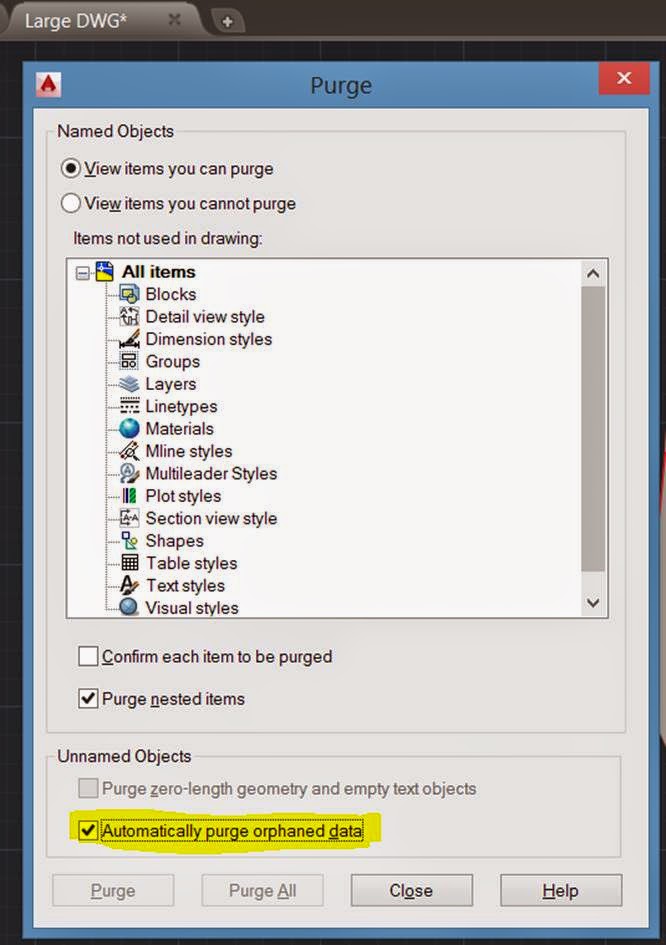
Enhanced Purge Command
I’ve previously documented about the use of the AutoCAD DGN Hotfix to resolve problems with unexpected file size increase. This hotfix had to be loaded, and then a separate command run.
In AutoCAD 2015, this has now been added to the standard Purge Command, as a tick box:
The Education Plot Stamp
Autodesk has updated the following document regarding the Education Plot Stamp and its removal:
Educational Plot Stamp Removal Issues
This now states that AutoCAD 2015 has the ability to remove the plot stamp.
Comments
0 comments
Please sign in to leave a comment.