
By Kim Hyde
If you have ever been infuriated following the successful installation of a whole Suite of software, you have selected `Stand Alone’ instead `Network License’ or vice-versa … and then found yourself stuck with what you’ve selected … I know have recently!

If it’s a 2017 product or set of products you’ve installed, then fear not! Autodesk has provided a simple fix to correct your mistake. Yes, there is no uninstall / re-install or registry-hack required.
Simply run the application (e.g. AutoCAD, Inventor etc.) and select the little down-arrow on the top-right of the application (next to the silhouetted man – sign in) and select Manage License, then select `Change license type’.
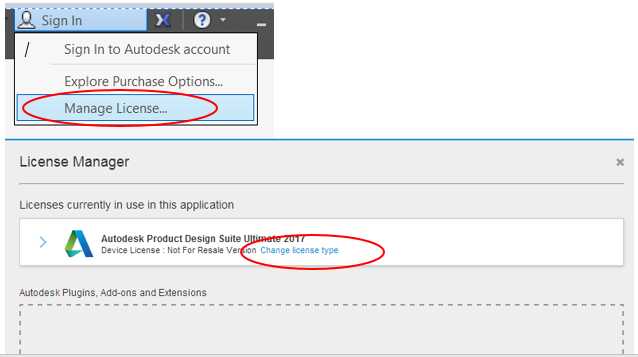
The application will then close.
Re-start the application and the choice for Stand Alone or Network will appear again!
For more information, please refer to the following Autodesk link:
Comments
0 comments
Please sign in to leave a comment.